
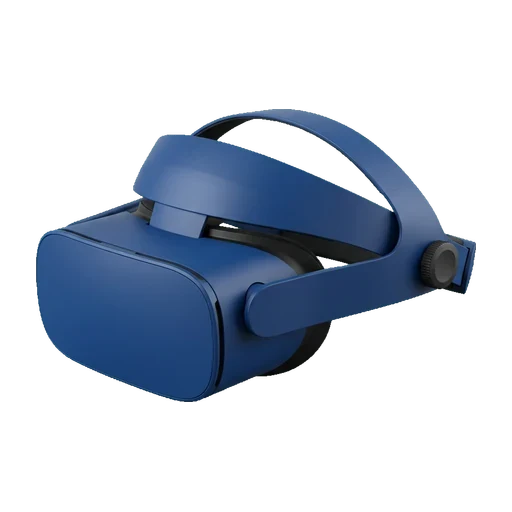
VIVE Pro 2 — specification and verdict
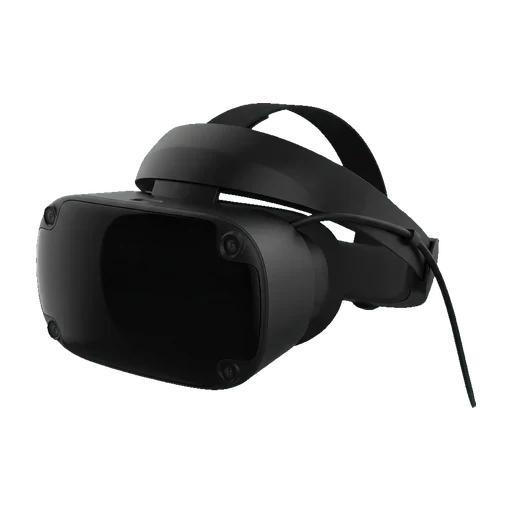
VIVE Pro 2 is a PC-tethered headset: it connects to a Windows PC and tracks through external SteamVR base stations. HTC lists dual LCDs at 2,448 x 2,448 per eye — among the sharpest here — with 90 and 120 Hz and a field of view up to 120 degrees. There is no colour passthrough, no eye tracking and no onboard processor; the PC does the rendering. The Full Kit bundles the headset with base stations and 6DoF controllers.
The training obstacles are the ones every PC-VR headset shares. Each unit needs its own capable PC and two mounted base stations, there is no vendor device-management or kiosk layer, and our courses do not run on it, because they are built for Android standalone headsets rather than SteamVR. It is available in Poland through HTC and aimed at high-fidelity PC VR — simulation, design review, research — not shared corporate training.
Skip the Pro 2 for Skillsive training: our apps will not run on it and the PC-and-base-station setup is wrong for a shared room. If your organisation genuinely needs desktop-class PC VR for engineering or research, it is a fine, sharp headset — but for putting staff through safety modules, HTC's own answer is the standalone VIVE Focus, not the Pro 2.
How it compares within its class
The axis runs from the lowest to the highest published figure among the VR — PC-tethered devices in this catalogue. The grey tick is the median of that class.
Median for this class: 110°, from 40 models that publish the figure.
Median for this class: $899, from 46 models that publish the figure.
Controllers and hand tracking
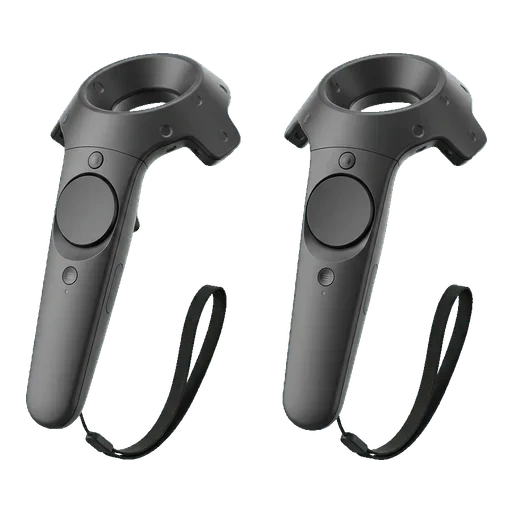
Vive Pro Controller
6DoF
The 2016 wand: a long grip under a ring of tracking sensors, with a circular trackpad where later controllers put a thumbstick. Base-station tracked, and it still pairs with any SteamVR headset.
In the boxHow it is tracked
Base stations (Lighthouse)
Base stations sweep the room with lasers. Coverage comes from where the boxes are mounted rather than from what the headset can see — occlusion stops being a problem, and the boxes are a second purchase.
The controller itself
- Controller weight
- 203 g
- Controller haptics
- Yes
- Controller inputs
- trackpad · face buttons · index trigger · grip buttons
Other controllers
Any SteamVR (Lighthouse) controller
Index Controller
Bare hands
No hand tracking — a controller is the only way in.
Full specification
An em dash means the manufacturer does not publish that figure.
- ManufacturerWho makes it — and who you buy support from.
- HTC VIVE
- CategoryWhich kind of product this is. It decides which rows below make sense at all.
- VR — PC-tethered
- Device typeWhere the computing happens, and therefore what you need to run it.
- PC-powered VR
- AnnouncedThe day it was shown, which is not the day it shipped.
- 2021-05-11
- ReleasedYear the model went on sale. Older is not automatically worse in this category.
- 2021
- AvailabilityWhether you can still order it new today.
- Discontinued
- Support endsThe date the manufacturer stops supporting it. Decisive for a fleet you are about to buy.
- Support ends: not published by the manufacturer
- PanelThe screen type. micro-OLED gives deeper blacks and higher contrast; LCD is brighter and cheaper.
- LCD
- OpticsThe lenses in front of the panel. Pancake stays sharp closer to the edges than older Fresnel, which decides how much a trainee has to aim their head to read something.
- Fresnel lenses
- Eyes coveredOne eye or both. Over a full shift this is a real difference in fatigue.
- Both eyes
- Resolution per eyePixels delivered to each eye. Higher means small text and labels stay readable.
- 2448x2448
- Refresh rateImages per second. Higher feels smoother and helps people prone to motion discomfort.
- 90/120 Hz
- Field of viewHow much of your view the image covers. Bigger is more immersive, not automatically better for work.
- 120° horizontal
- Pixel densityPixels per degree of view — the honest way to compare sharpness between a headset and a pair of glasses. Higher is sharper. Only shown where somebody published it; we never compute it ourselves.
- Pixel density: not published by the manufacturer
- BrightnessIn a plant or outdoors, brightness decides legibility more than resolution does.
- ≈110 nits*Notebookcheck measurement
- WeightThe device alone. Anything above roughly 150 g is felt within an hour.
- Weight: not published by the manufacturer
- Visible field of viewWhat the eye actually sees through the optics, by axis.
- 116° horizontal · 96° vertical
- Rendered field of viewWhat the device draws. Never smaller than what you see.
- 116.52° horizontal · 96.49° vertical · 113.3° diagonal
- Binocular overlapWhere both eyes see the same thing — this is where depth happens.
- 79.83°
- Average pixel densityPixels per degree across the image. More is sharper.
- 21.1 PPD horizontal · 25.5 PPD vertical (computed)
- Peak pixel densityThe sharpest point, usually the centre of the lens.
- Peak pixel density: not published by the manufacturer
- Subpixel layoutHow the coloured dots sit in a pixel. A stripe looks cleaner on text than PenTile.
- RGB stripe · 3 subpixels per pixel
- Foveated renderingWhether detail is dropped outside where you look, to save performance.
- None
- PassthroughWhat the front cameras give you: colour, grayscale, or nothing.
- None
- Passthrough camerasResolution, density and frame rate of that camera feed.
- Passthrough cameras: not published by the manufacturer
- IPD adjustmentMatching lens spacing to the eyes. Motorised is fastest when one headset passes between people.
- Manual
- IPD rangeHow far the lenses travel to match eye spacing. A narrow range excludes part of any group of adults, which matters when one headset is shared.
- 57–70 mm
- Works with glassesWhether people who wear glasses can use it — fits over them, or takes prescription lens inserts.
- Yes
- Vision correctionHow somebody who wears glasses uses it, and in what dioptre range.
- Vision correction: not published by the manufacturer
- DimensionsWidth, height and depth of the device itself.
- Dimensions: not published by the manufacturer
- Weight with strapWith the strap it ships with — the weight you actually wear.
- ≈850 g*Notebookcheck review
- Head strapSoft band or a rigid one. Decides how the weight sits over an hour.
- Rigid strap with a dial
- MaterialsShell and facial interface, in the vendor’s words.
- Plastic · foam facial interface
- ColoursColours the manufacturer sells it in.
- Black · Blue
- Haptics in the headsetVibration in the headset itself, not in the controllers.
- No
- TrackingWhether content stays put in the room (6DoF), follows head rotation (3DoF) or is simply fixed.
- outside-in 6DoF (SteamVR base stations)
- Base stationsWhether boxes have to be mounted on the walls before it works.
- Required
- Tracking camerasHow many cameras it uses to know where it is.
- Tracking cameras: not published by the manufacturer
- Tracking rateHow often position is recalculated. Higher is steadier.
- Tracking rate: not published by the manufacturer
- Depth sensorA dedicated sensor for distance, on top of the cameras.
- Depth sensor: not published by the manufacturer
- Hand trackingWhether bare hands can operate the interface, without a controller or the phone.
- No
- Eye trackingThe headset knows where the trainee is looking. Enables sharper rendering where they look, and attention analytics.
- No
- Face trackingTracks facial expression — for avatars, not for training scenarios.
- No
- Body trackingHow much of the body the device knows about. Estimated legs are not tracked legs.
- None
- Controllers includedWhether motion controllers come in the box, or are bought separately — or the device is hands-only.
- Yes
- Controller modelThe manufacturer's own name for the controller.
- Vive Pro Controller
- Controller tracking6DoF controllers track position and rotation, so a hand reaches in space; 3DoF only point. “None” means hands only.
- 6DoF
- Controller tracking methodWhat establishes where the controller is. It decides whether the controller keeps working behind your back or down at your hip — “6DoF” on its own does not say.
- Base stations (Lighthouse)
- Other controllersWhether the headset works with controllers other than the ones it ships with.
- Any SteamVR (Lighthouse) controller — Index Controller
- Finger tracking on the controllerWhether the controller senses individual fingers, and how.
- Finger tracking on the controller: not published by the manufacturer
- Controller inputsButtons, sticks and triggers the controller offers.
- trackpad · face buttons · index trigger · grip buttons
- Controller hapticsVibration feedback in the hand.
- Yes
- Controller powerDisposable cells or a built-in rechargeable — a fleet question.
- Controller power: not published by the manufacturer
- Controller weightOne controller, as the vendor weighs it.
- 203 g
- Other input methodsWays in beyond controllers and bare hands.
- Other input methods: not published by the manufacturer
- Runs Skillsive appsOur own statement about whether Skillsive training applications run on it today.
- No
- Suitable for trainingOur judgement on whether it survives real deployment: comfort, hygiene, fleet management.
- No
- Kiosk mode / MDMVendor tooling to enrol devices, push an app and lock the headset to it. Practically required above ten devices.
- No
- Business tierAn official business tier, so devices belong to the company rather than to employees’ personal accounts.
- No
- Swappable facial interfaceRemovable, wipeable face padding. A consumable, and the difference between shared use and complaints.
- No
- CertificationsIndustrial certifications stated on the manufacturer's own page. Empty means unconfirmed, never "probably fine".
- Certifications: not published by the manufacturer
- PortsPhysical sockets and charging contacts.
- USB Type-C
- Wi-FiThe Wi-Fi generation — it decides how well wireless streaming holds up.
- Wi-Fi: not published by the manufacturer
- BluetoothFor controllers, headphones and accessories.
- Bluetooth: not published by the manufacturer
- Video from a computerWhether a computer can drive it, over a cable or wirelessly.
- Over a cable (Available via VIVE Wireless Adapter, sold separately)
- AudioBuilt-in sound. Matters most where somebody has to hear a remote expert while working.
- Built-in speakers · Headphone jack
- MicrophoneBuilt-in microphone — the other half of talking to a remote expert.
- Yes
- MicrophonesHow many. An array picks a voice out of a noisy hall; one does not.
- 2
- Price bandThe band it sits in, rather than a price that goes stale.
- Premium
- Launch priceThe manufacturer's launch price. Fixed history, so it never goes stale.
- $1399
- Price by configurationWhat each configuration cost at launch.
- Price by configuration: not published by the manufacturer
- Price todayApproximate current net price in USD — a general figure, since these barely differ between regions once tax is stripped out. A snapshot from the date shown, not an offer.
- Price today: not published by the manufacturer
- Comfort (from reviews)How it wears over a full session. Scored from agreement between independent reviewers, not from our own testing.
- Comfort (from reviews): not published by the manufacturer
- Edge clarity (from reviews)Sharpness away from the centre of the lens. Scored from agreement between independent reviewers.
- Edge clarity (from reviews): not published by the manufacturer
- Tracking reliability (from reviews)How tracking holds up in poor light and fast movement. Scored from agreement between independent reviewers.
- Tracking reliability (from reviews): not published by the manufacturer
- Hand tracking quality (from reviews)How usable controller-free hand tracking is in a training scenario. Scored from agreement between reviewers.
- Hand tracking quality (from reviews): not published by the manufacturer
Average pixel density is our own arithmetic: panel pixels divided by the field of view on the same axis. It is the standard approximation, and it runs lower than a published peak figure because a lens packs pixels denser at the centre.
Who this device is for
VIVE Pro 2 is a tethered PC VR headset from HTC's professional line, discontinued but still installed in plenty of labs and simulator rooms: 2448x2448 per eye at 120 Hz, base-station tracking, and no standalone mode at all. Our courses do not run on PC VR, so this page exists to describe hardware an organisation already owns.
How it differs from its predecessor
Against VIVE Focus 3 and Focus Vision, which share the panel resolution, the difference is the whole deployment model: those are standalone business headsets, this is a display driven by a PC with base stations mounted in the room. Against the Valve Index of the same era it wins on resolution and loses on comfort and controllers.
What is missing, and what the manufacturer does not publish
Discontinued, with no hand tracking, no eye tracking, no standalone mode and a dependency on base stations and a capable PC. HTC never published a weight for it: the 850 g we list is the whole headset including its rigid strap, measured by reviewers, and no strapless figure exists. Brightness likewise comes from a lab measurement, not from HTC. Our training applications do not run on it.
VIVE Pro 2 in independent reviews
Reviews we consider worth your time, each with a note on what the reviewer actually tested and why it matters for a training rollout. We do not own this hardware, so the tests are theirs — the reading of them is ours.
- MRTV - MIXED REALITY TV2021
The full review, and the useful part is the direct comparison against the Reverb G2 and the Valve Index — the three headsets a PC VR buyer was choosing between in 2021. The upgrade question it asks is still the right one for anyone running a Pro 1.
Watch on YouTube - Cas and Chary XR2021
A week of testing that concludes the headset is genuinely odd: a very high resolution paired with compromises that show up quickly. That combination is why the Pro 2 divided opinion the way it did.
Watch on YouTube - SadlyItsBradley2021
A hardware-analysis review of the panel, the field-of-view claims and what the compression does to the image. The most technical of the three, and the one to watch if the specification numbers are what drew you in.
Watch on YouTube
Nothing is sent to YouTube until you press play. Once you do, Google receives your IP address and device data and may process them outside the EEA — see our privacy policy for the details.
VIVE Pro 2 — frequently asked questions
- Is the VIVE Pro 2 still supported?
- HTC discontinued it, so no new units, and support means what is left of the channel. It continues to work with SteamVR and current base stations, which is why installations built around it are still running — but any plan for it should have a replacement date in it.
- How does the VIVE Pro 2 compare with the VIVE Focus 3?
- Same 2448x2448 panel, entirely different device. Focus 3 is standalone, has hand tracking, device management and a swappable battery; the Pro 2 needs a PC, base stations and a cable, and offers a 120 Hz refresh rate the Focus 3 does not.
Compare this device
Consider these too
The nearest devices in the same class, ranked by availability and launch price — not by our opinion of them.
Specifications checked against the manufacturer's page on 2026-07-21. Manufacturer's specification
Product and company names used here are the trademarks of their respective owners and appear only to identify the hardware being compared. We are not affiliated with, sponsored by or endorsed by any of these manufacturers. Illustrations are our own.